Deterministic media renaming for professional archives

Rename media with the timestamp you can trust

Date Renamer Toolkit aligns media to the most reliable capture time with clear diagnostics and a live rename preview. Built for professional libraries and long-term archive stability.

Windows · macOS
ExifTool first
Undo (last session)
Parallel scan
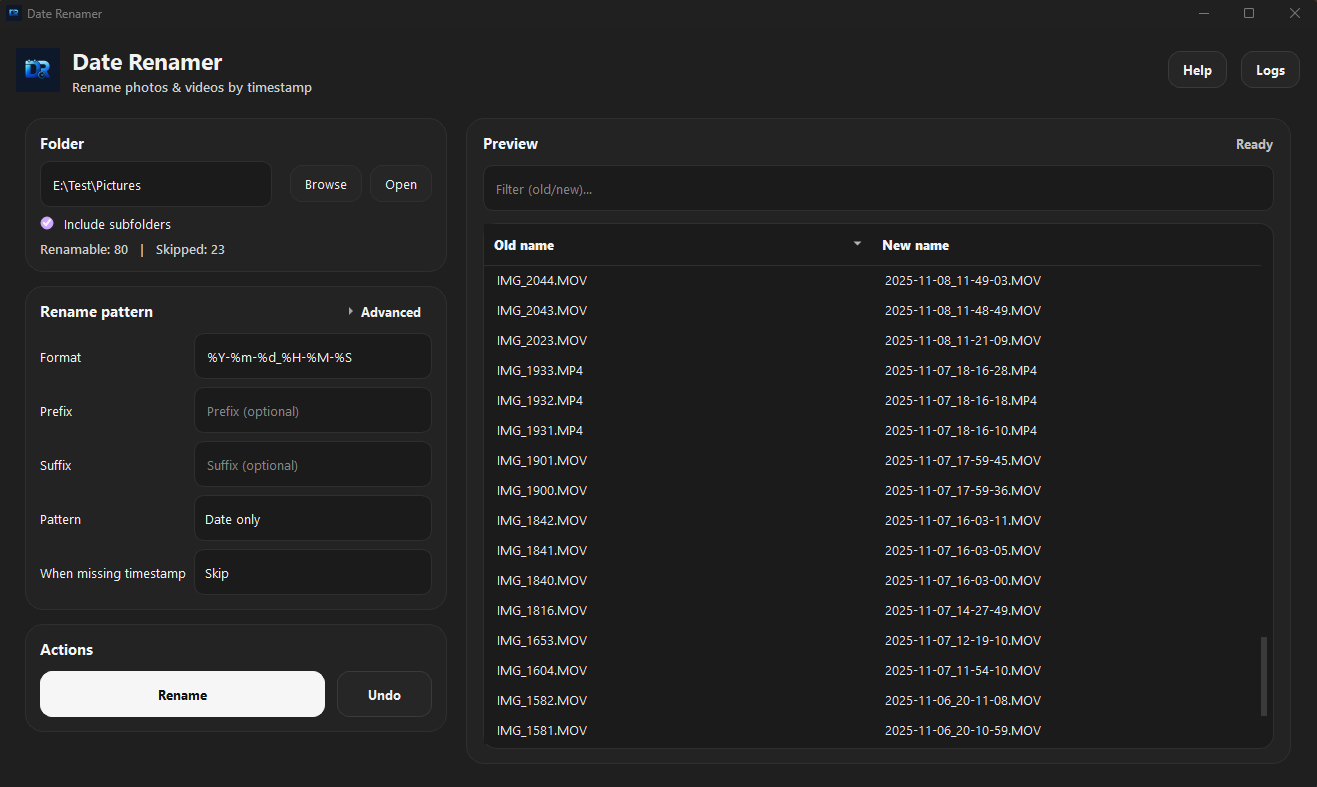
Date Renamer Toolkit UI preview

Audit-ready

Deterministic logs and verifiable rename trails.

Why this exists

The renamer I needed for a reliable archive

Date Renamer Toolkit exists because years of mixed media sources made reliable ordering nearly impossible. I needed a Windows app that sorted photos and videos by the actual capture time, with no guessing and no silent assumptions.

For editing and NAS archiving, I need a repeatable flow: timestamp in, filename out, done. No UI stalls, no hidden decisions. Today, the toolkit delivers deterministic, fast, and transparent renaming with a professional desktop experience.

The core problem

To edit, archive, or retrieve media later, the results must be trustworthy.

Where other tools failed

Videos differ from JPEGs, exports remove metadata, and Takeout needs sidecars.

What this tool delivers

Finds the best timestamp, shows the source, resolves collisions, and previews every rename.

How it works

A transparent pipeline from scan to rename

Step 1

Scan folder

Select a folder and batch scan all media files.

Step 2

Resolve timestamp

Uses ExifTool first with clear source visibility.

Step 3

Preview rename plan

Live preview shows old and new names with diagnostics.

Step 4

Rename and undo

Apply deterministic renames and undo the last run.

exiftool:QuickTime:CreateDatetakeout_jsonfilename:DJI_YYYYMMDD_HHMMSSfs_created (optional)
Built for deterministic archives

Features that explain every rename decision

Every file shows exactly where its timestamp comes from, so every rename is auditable.

Live Preview

Review old and new filenames with diagnostics before any change is applied.

ExifTool first

Batch scanning uses ExifTool priority with transparent sources.

Deep Mode

Filename patterns, XMP, and Google Takeout JSON sidecars included.

Safe rename

Collision safe naming so every rename remains predictable.

Parallel scan

Designed for large folders and NAS archives without UI stalls.

Undo last run

Undo the last rename session to recover fast when needed.

Use cases

Built for workflows that demand accuracy

Video editing prep

Rename footage once, then import cleanly into your editor.

NAS archive

Keep consistent structure across devices and exports.

Google Takeout

Sidecars are respected, so exports stay trustworthy.

DJI and action cams

Filename timestamps are parsed in Deep Mode.

Download

Get Date Renamer Toolkit

Release builds ship as native apps. No Python required.

Open Source

Contribute patterns, ideas, and feedback

Releases

Grab the latest build for your OS.

GitHub Repo

Source code, roadmap, and documentation.

Issues & Patterns

Report problems or contribute filename patterns.